A Windows Prefetch directory is a good example of a folder that is small and slow at the same time. Ours held 2,000 files of about 15 KB each, which is 30.7 MB in total, and we mounted it from a machine in Timisoara onto a Windows machine in Singapore and read every file in it, one after another, from the first to the last.
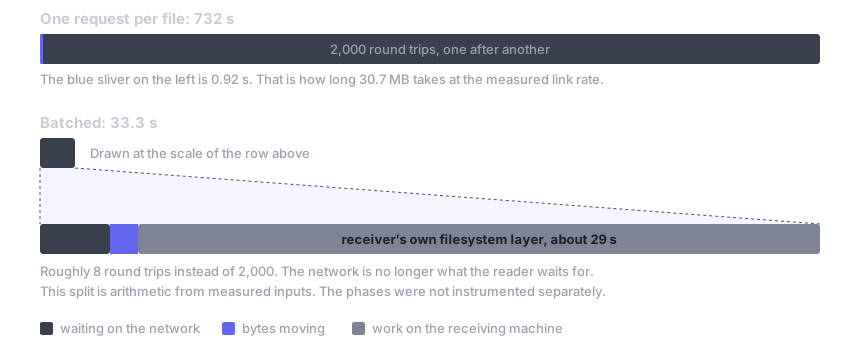
On the first pass it took 732 seconds, and the link between those two machines moves 33.4 MB/s, so the same 30.7 MB would have gone across in 0.92 seconds if you sent it as one stream. The read was using about 1/8 of 1% of the connection, and for the rest of the time the link was doing nothing at all.
The client asked for one file at a time: it sent the request to Timisoara, waited for the answer to come back, and only then asked for the next one. Across 2,000 files that works out at 366 ms of waiting each, which is roughly what a round trip costs on that path. A faster link would not have helped, because there was never more than one request in flight.
We ran into this first while recording a forensics triage demo, where copying out 2,174 small files took just over seven minutes on a home line. That recording is on YouTube with the write-up at keibidrop.com. The figures there are not comparable with the ones below, because it used different machines, a different link, and a build from before this work.
We measured this on two VPS boxes over one intercontinental link
Everything below was measured on one pair of machines over one link, so the specs are collected here once and the rest of the post refers back to them.
Machines, link and tree, in full
| Holds the files | Reads them | |
|---|---|---|
| Location | Timisoara | Singapore |
| Hardware | VPS, Xeon Gold 6140 at 2.30 GHz, 4 vCPU, 15 GB RAM | VPS, virtualised CPU reported as "Common KVM Processor v5", 4 vCPU, 8 GB RAM |
| Operating system | Ubuntu 24.04.4, kernel 6.8.0-101 | Windows Server 2022 |
| Filesystem layer | None. Shares the folder read-only with no driver installed | WinFsp 2026 Beta4, mounted as K: |
| Build | commit 00d0905 | commit 00d0905 |
The link measured 33.4 MB/s, which is 267 Mbit, on a raw 1 GB TCP transfer on 16 August, and round trip time in that session came out at about 200 ms. The 366 ms per cold read we saw on 21 August is an upper bound on round trip plus relay plus the work the origin does.
The path is relayed through our bridge, which happens to run on the Timisoara box, so the hop between Singapore and Timisoara is the whole distance. The two machines sit in different datacentres and do not share an uplink.
| The tree | |
|---|---|
| Files in the share | 2,003, 62 MB, regenerated before every run |
| Files read | 2,000, 15,360 bytes each, 30,720,000 bytes in total |
| Layout | All 2,000 sit in one directory, \triage\pf. Flat, no nesting |
| Not read | Three files of 10 MiB in a sibling directory |
The reader is a single PowerShell session calling ReadAllBytes on K:\\triage\\pf\\*.pf, one file at a time, in the order they are listed.
How we brought the read of 2,000 files down from 732 seconds to 33
In the table below, the first column is the run with the new code turned off using KEIBIDROP_WARM_SIBLINGS=0, and the second column is the same read of all 2,000 files with it turned on. We established the baseline a few minutes before the second pass, on the same link and tree, so that setting is the only thing separating the two numbers.
| 2,000 files, 30,720,000 bytes | One request per file | Batching the requests |
|---|---|---|
| Wall clock | 732.12 s | 33.30 s |
| Rate | 2.7 files/s | 60.1 files/s |
| Share of the link in use | 0.13% | 2.8% |
| Bytes received | 30,962,935 (0.79% over payload) | 30,971,833 (0.82% over payload) |
| Bytes sent | 191,053 | 52,448 |
| Runs | n=3: 714.58 / 752.31 / 732.12 s | n=1 |
We measured the baseline in that same hour and ran it three times, with all three landing inside a 5% band, which is why we are comfortable putting a single batched run beside it. A second one would still be worth having.
Performing a round trip for each file adds up quite fast
A round trip costs the same whether you ask for 15 KB or 15 bytes, so the price is paid per file and not per megabyte. That is why a folder of 2,000 small files is expensive and a single 30 MB file is not, even though the two hold the same amount of data. On a local network the trip is under a millisecond and nobody notices, but at 200 ms it becomes the whole of the run time.
Opening a file also set up four gRPC read streams with a 16 MiB buffer each on the origin, so a 15 KB file was costing four connections and 64 MiB of buffer to move less than one block of data.
Reading one small file now pulls the others in that directory too
When you read a file of 256 KiB or less for the first time, we now send one extra request in the background that pulls the other small files from that directory into the local cache. It fetches up to 4 MiB or 512 files, whichever comes first, in the order the reader is likely to ask for them, and the reads that follow come off the local disk. For this directory that turned 2,000 requests into roughly 8.
The stream pool is now sized to the file as well, so a small file opens one stream rather than four, and the origin's stream buffers allocate on first use instead of at open.
Some files are deliberately left alone. Files over 256 KiB keep the per-file path, because they are already large enough that one round trip is a small part of what they cost, and files you have edited locally are never touched, and neither are files the origin has not announced. If a batch fails, or the peer is too old to understand the request, the read falls back to the old path and the session remembers that, so a peer on an older build carries on working normally and simply does not get the speedup.
It is on by default, and you can turn it off by setting KEIBIDROP_WARM_SIBLINGS=0 before mounting.
Batching only moved 0.03% more bytes than the old path
Prefetching can buy speed by moving data nobody asked for, and that did not happen here. The difference is 8,898 bytes, and the requests going the other way dropped to about a third, because 2,000 of them became a few dozen.
That number holds because the test reads every file in the directory, so everything warmed gets used. If you open one file and stop, the batch has still pulled up to 4 MiB of neighbours you will never touch. The cap limits how far that goes and the kill switch turns it off, but the cost is there if your reads are selective.
Now the receiving machine became the slow part
With the round trips gone, the bottleneck is now inside the receiving machine. Of the 33.3 seconds, roughly 3 go on waiting for the network and roughly 1.2 on moving bytes, and the other 29 are spent between WinFsp and the reader, at about 14.4 ms per file. The same read through macFUSE on a loopback pair costs 0.40 ms per file.
That split is arithmetic from the measured totals rather than a per-phase profile. The two per-file figures come from different operating systems on different hardware, and the 14.4 ms is from a virtualised server CPU, so it shows the shape of the problem rather than a number to quote for a laptop.
The loopback control shows the same change with the network taken out entirely. Reading 400 files of 15 KiB through macFUSE on one machine went from 445 files/s to 2,489 files/s, a factor of 5.6, with the wire equal to the payload in both modes. That is the part of the gain that comes from doing less work per file, and the rest of what we saw over the link is round trips that are no longer there.
We have not fixed everything, and batching can still waste bytes
- The first file of each batch still blocks for a full round trip, because batches are not fetched ahead of the reader yet, so about 8 waits remain in this test.
- Reading one file out of a large directory can transfer up to 4 MiB of neighbours that are never used.
- Warming works inside one directory, so a flat folder of 2,000 files is the best case for it. A deep tree holding three or four files per directory batches three or four at a time and gets much less out of this.
- Files over 256 KiB are unchanged, and so are writes and uploads.
- A peer on an older build gets the old path from end to end.
- The receiver's per-file filesystem cost is untouched, and it is now the larger of the two terms.
- File count and byte count matched exactly on both passes, but we did not compare content hashes across the two machines on this rig. Byte-exactness for this path is covered by the test suite, including a macFUSE test that byte-compares every warmed file.
- The baseline ran three times and the batched pass ran once.
Use the full wire
The transfer was limited by latency and is now limited by bandwidth and by the receiving machine. The uplink is being used instead of sitting idle, and the uplink is also what you are now up against.
Once the round trips are gone, the floor is the bytes divided by your upload speed. On a 50 Mbit/s connection, 382 MB takes 61 seconds at best, whatever the client does. Batching gets you to that floor by keeping the line busy, and past that point the way to go faster is to read fewer bytes, which is what mounting instead of copying is for in the first place.
The same read on a short, low bandwidth link would put the two limits the other way round. That one has not been measured.